# mumh5
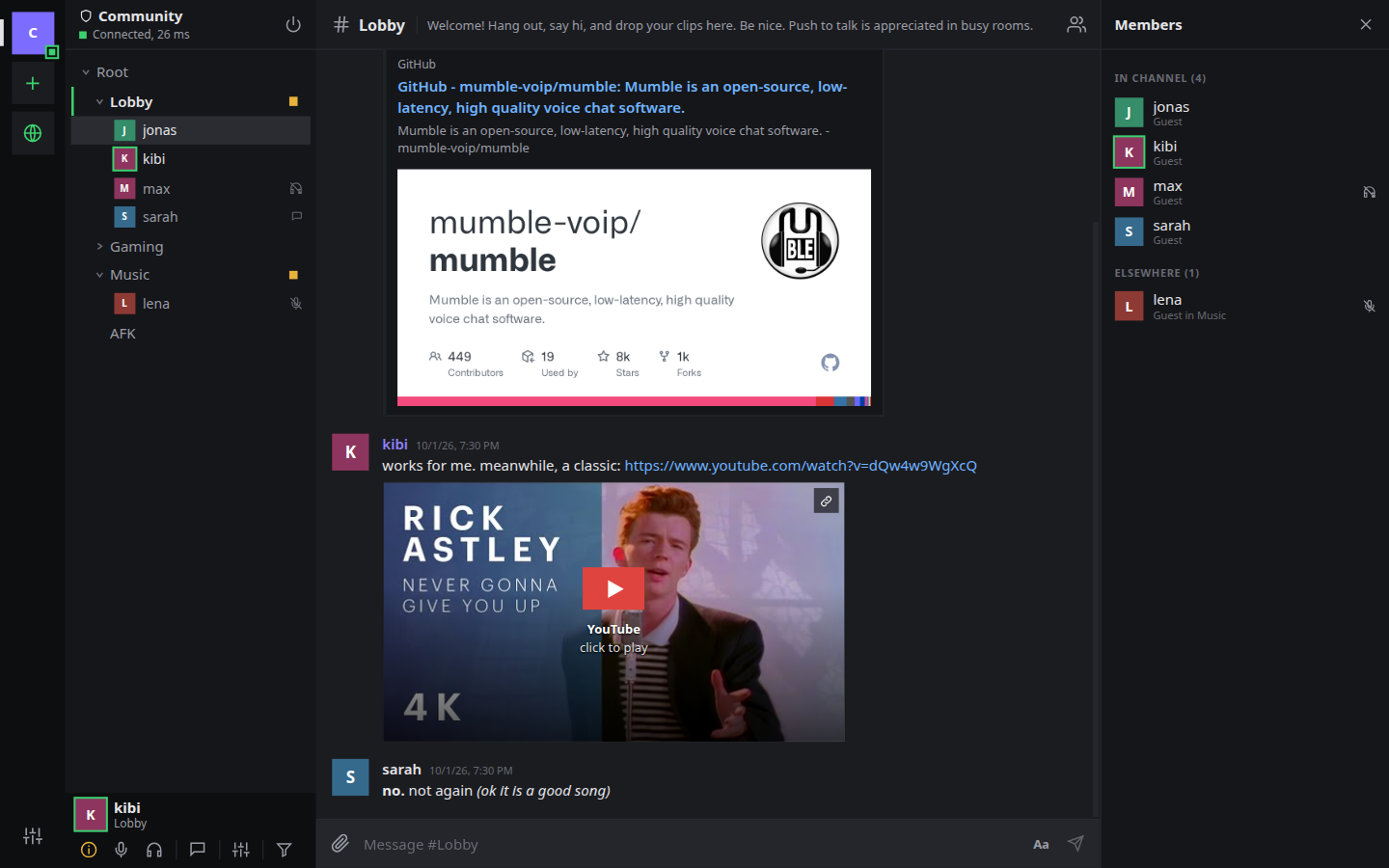
mumh5 is a client for [Mumble](https://www.mumble.info/), the open source voice chat. It runs on Windows, macOS and Linux, and in a browser through a small proxy you host yourself.
It connects to any Mumble server as it is. Nothing has to be installed or changed on the server, and people on the regular Mumble client see and hear you like anyone else.
---
## What it does
- **Voice**: Opus over encrypted UDP, with voice activity, push to talk or always on.
- **Chat**: a separate chat per channel and person, with files, pictures, formatting and link previews.
- **Several servers at once**: text on all of them, voice on the one where you joined a channel.
- **Screen and camera sharing** between mumh5 users in a channel.
- **Text channels** between mumh5 users: read and written without joining them.
- **Channel management**: create, edit, move and link channels, and edit permissions and groups.
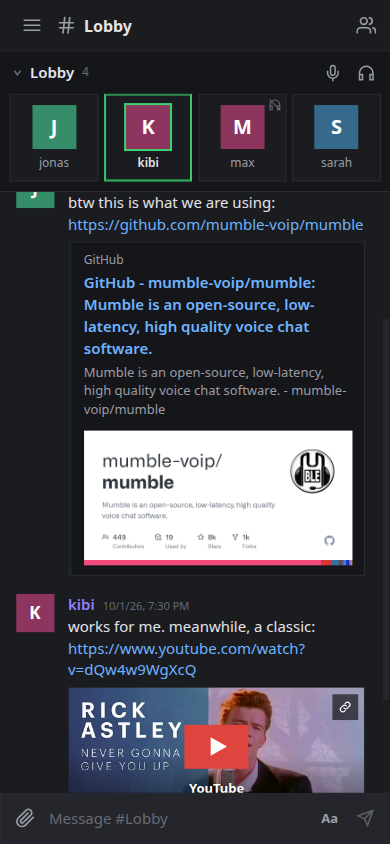
- **Two interfaces**: Standard (channel tree, chat and members side by side) and Rooms (one screen at a time, made for phones).
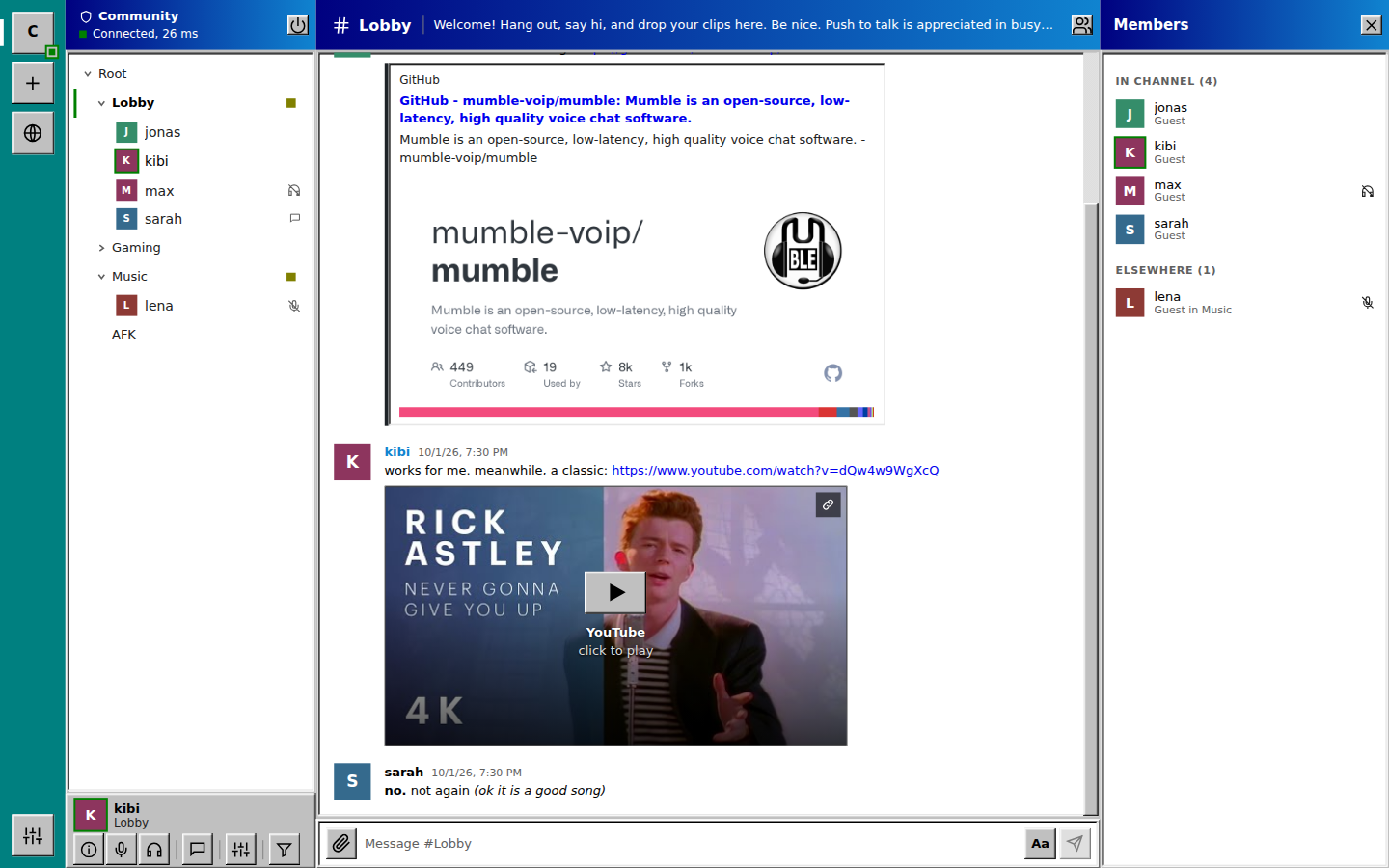
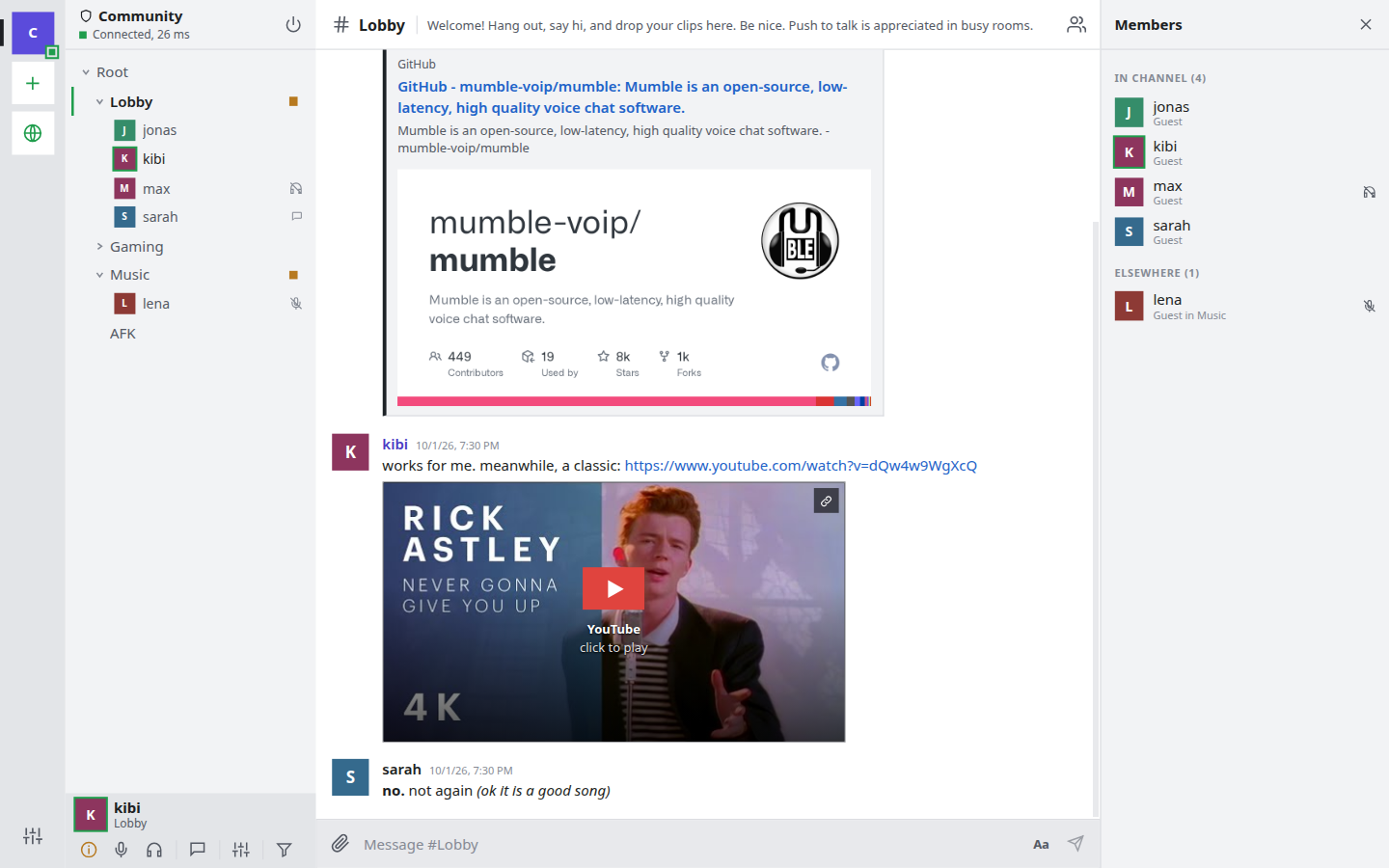
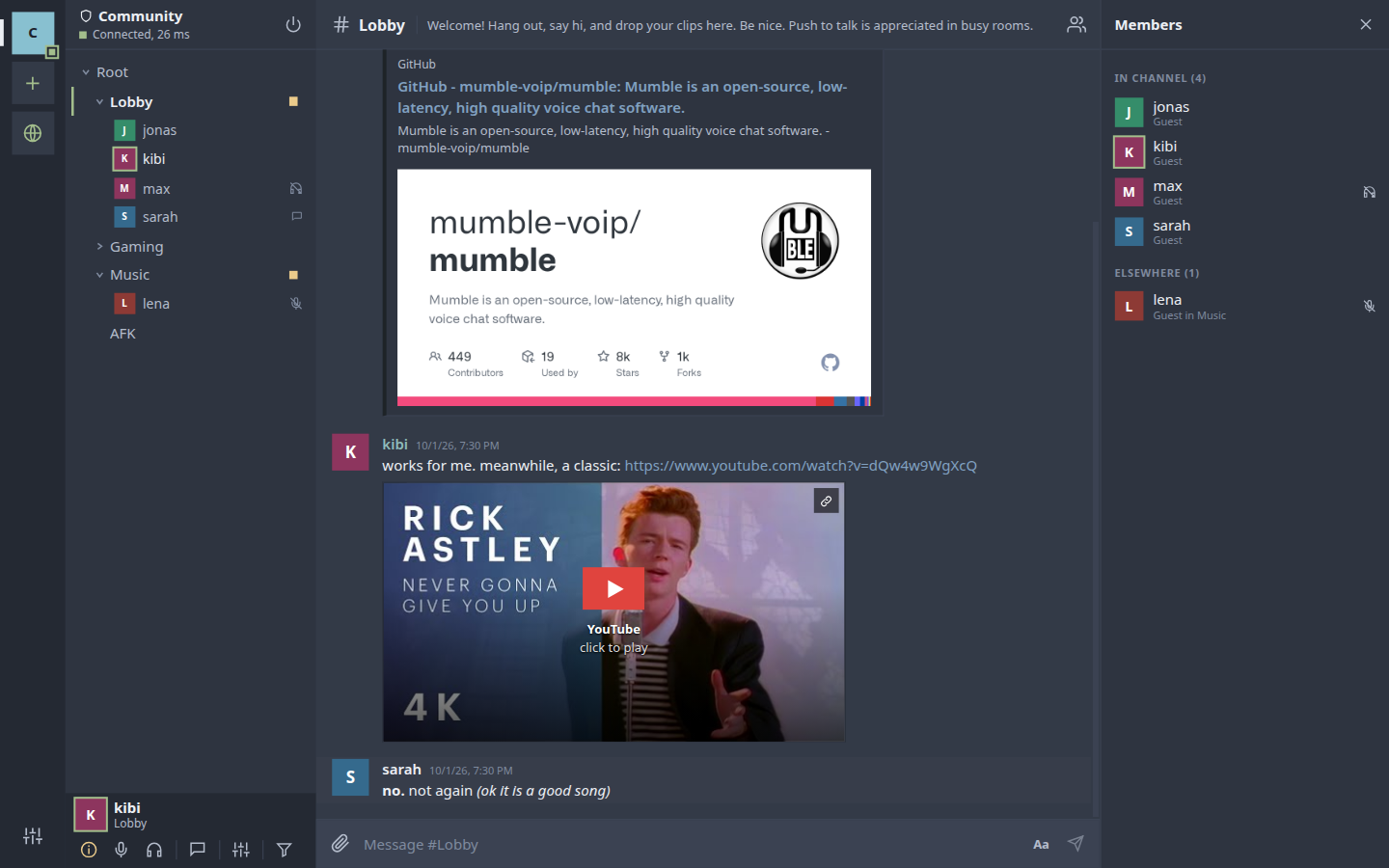
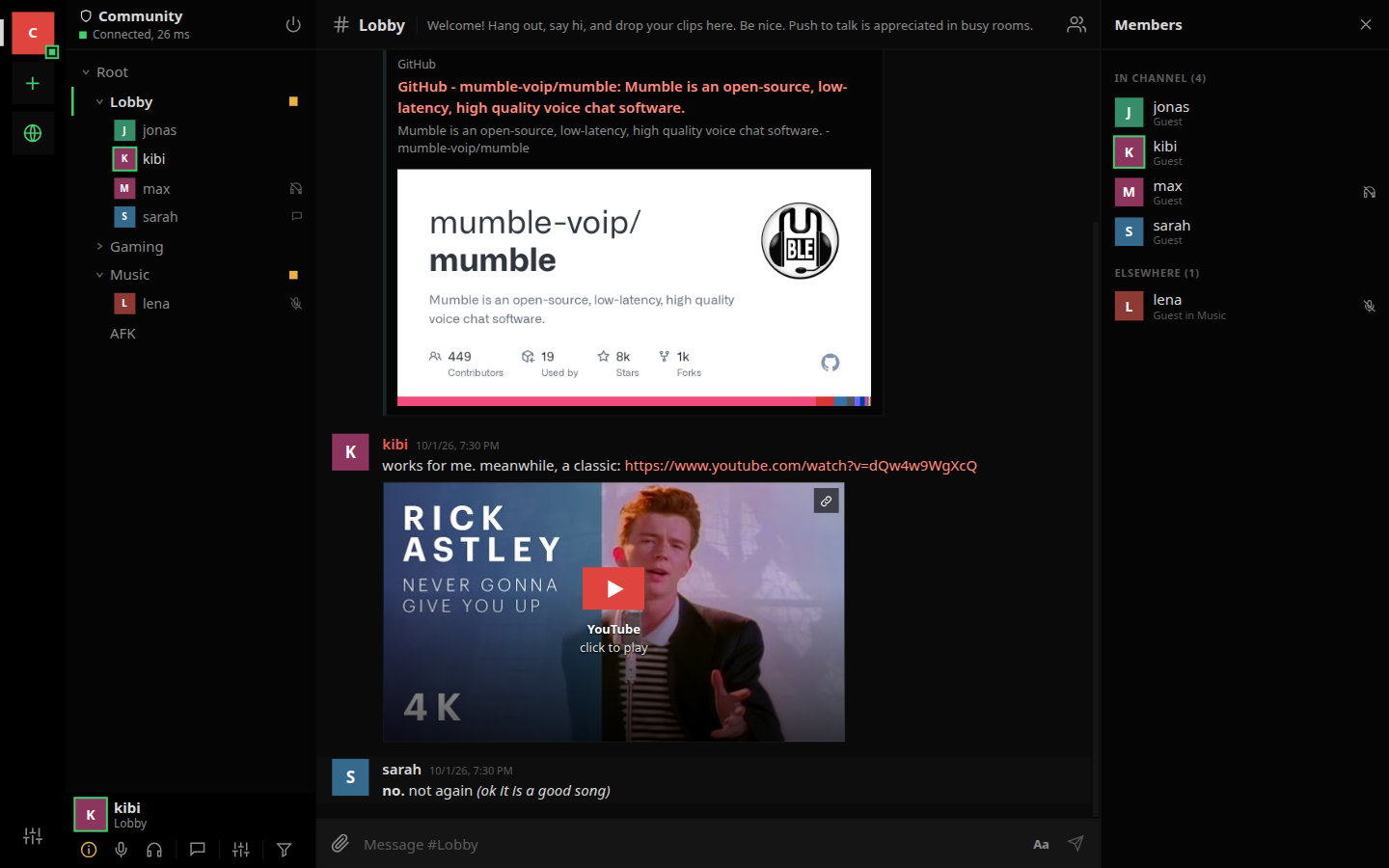
- **100 color schemes**, from Dark and Light to Windows 95.
Some features only work between mumh5 users, because Mumble itself has no such thing: screen and camera sharing, text channels, and inline players for shared files. People on other Mumble clients are not disturbed by them; they see a normal channel, a normal link, or nothing.
### Not in mumh5 yet
System-wide push to talk, whisper and shout, positional audio, the in-game overlay, recording, and the ban list and registered-user editors. The Mumble desktop client has these.
---
## Features
### Voice
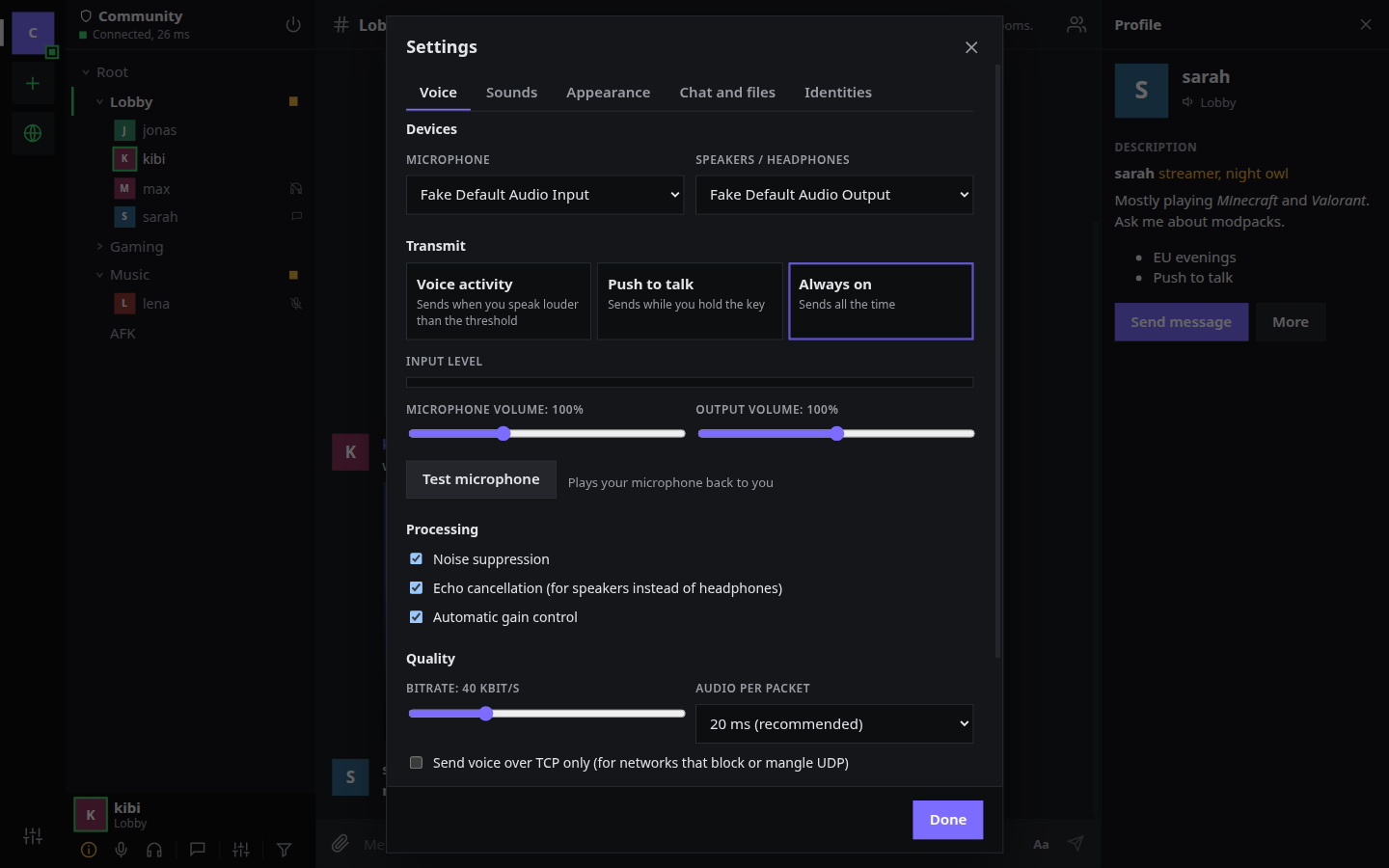
- Voice activity detection with a live level meter and an adjustable threshold, push to talk, or always on
- Noise suppression, echo cancellation and automatic gain control
- Microphone and output selection, input and output volume
- Per-person volume (0 to 300%) and "mute for me"
- Speaking indicators in the channel tree, the member list and your own panel
- Encrypted UDP (Mumble's OCB2-AES128), with fallback to the TCP connection and a TCP-only switch
- Bitrate limited to what the server allows
- Right-click mute or deafen for quick device and volume options
- Microphone test that plays your voice back to you
- Optional: give the microphone back while muted, so a Bluetooth headset stays out of its telephone mode. On by default on phones; not yet tried on a real phone
### Channels and people
- Channel tree that starts collapsed; channels with people in them open up
- Single click shows a channel's description, double click joins
- Side chat: write in any channel without leaving yours
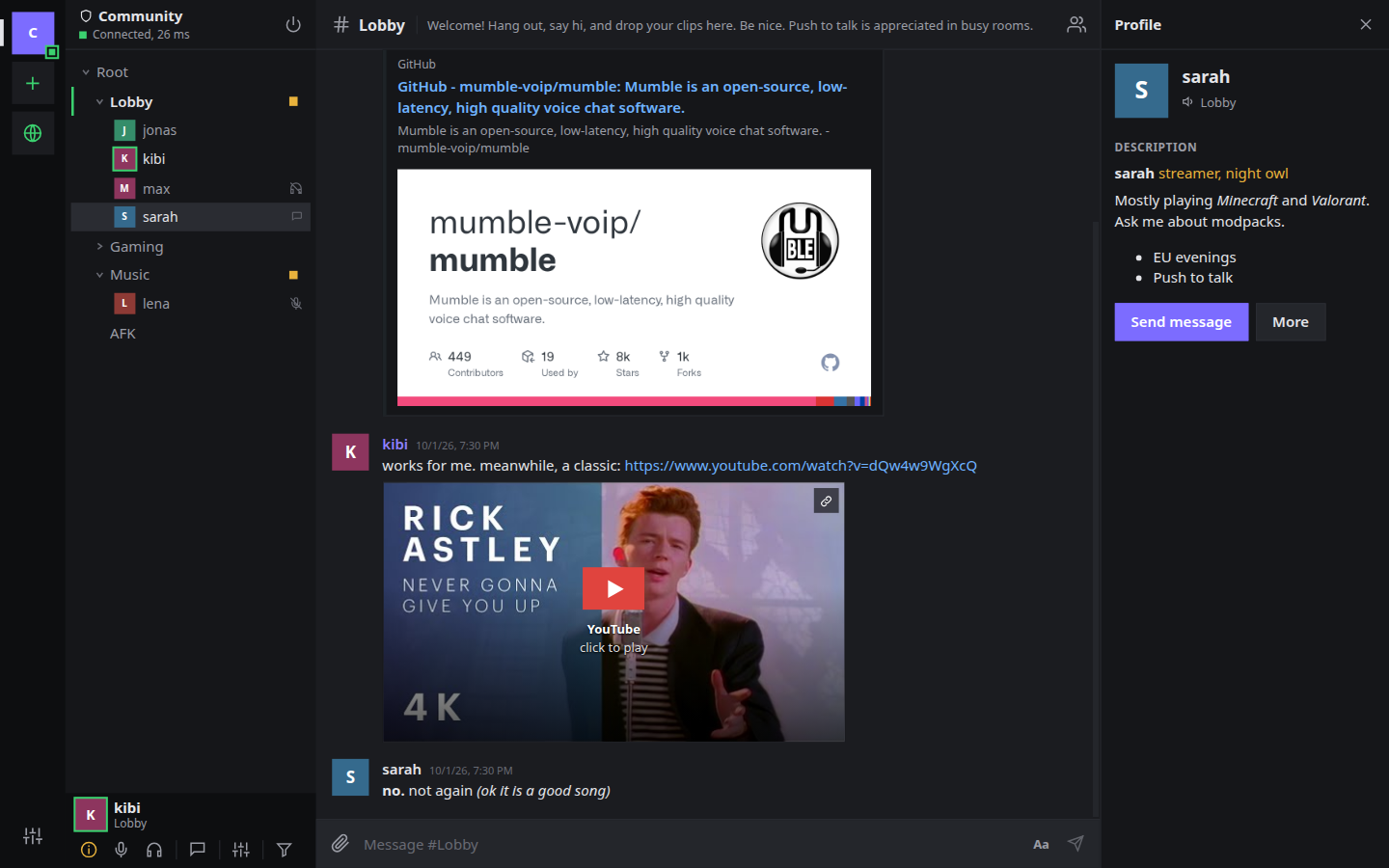
- Profiles with formatted descriptions, local nicknames and registration status
- Change your name (mumh5 reconnects for you) and register on a server
- Connection information: ping, packet loss, client version and, for admins, the certificate chain
- Moderation from the right-click menu: move, server mute and deafen, priority speaker, kick, ban, register
- Create, edit, delete and link channels. Drag a channel into another, or in front of or behind it; drag people between channels
- Permission editor: rules per channel with inheritance, groups and members
- If you are kicked, you see who did it and why, with a Reconnect button
### Chat
- Messages grouped by author, direct messages, unread badges
- Files by drag and drop, paste or the attach button, with upload progress (needs an [upload host](#file-sharing-with-f0ckm); pictures work without one)
- Inline pictures, video and audio for shared files
- YouTube links as click-to-play players (off by default)
- Link previews with title, description and picture
- Incoming HTML is sanitized, and pictures from unknown hosts are never loaded
- Messages stay readable in the Mumble desktop client
### Text channels
- A channel marked as a text channel is read and written without joining it, from any voice channel
- It is a normal Mumble channel on the server, created and removed with the usual channel permissions
- The server keeps no messages. Each client keeps the last 200 per channel and passes the last 50 to people who connect later
- Everyone on the server who uses mumh5 can read them; there are no private text channels yet
- Needs a server from version 1.4 that allows HTML
### Screen and camera sharing
- Share a screen, a window or a camera with the mumh5 users in your channel. A dialog shows a preview and lets you choose the sound and the quality first
- Cameras appear in the voice tiles, several at once; a click enlarges one
- A screen opens large, with the people as a strip of tiles below, and can move to its own window
- Sound: on Linux one program or everything except mumh5 (through PipeWire); on Windows the whole system; in a browser what the browser offers
- The stream goes directly between the two clients (WebRTC), up to 8 viewers per stream. Only the setup messages pass through the Mumble server
- Sharer and viewer see each other's IP address; mumh5 says so before the first use
- Across the internet both sides need a STUN server. The browser version uses its proxy's, with a relay when no direct connection works. In the desktop app you set one in Settings, Voice. Nothing is contacted unless you set it
- Tested between two instances on one machine with a test picture. Sound capture, real screens, connections across the internet, Windows and the browser build are untested
### Interfaces and look
- Standard interface in three layouts: channels left and members right, chat left and channels right, or channels on top
- Rooms interface: rooms as a list with the people inside, a voice screen, a people screen, and mute and deafen always in reach. New and not complete: channels and people cannot be moved by dragging there yet
- 100 color schemes with a search box. Eleven are made by hand, the rest are generated from a hue and an accent
| Windows 95 | Light | Frost | Midnight |
|---|---|---|---|
|  |  |  |  |
### Sounds
- Notification sounds for joins, leaves, messages, mute, push to talk, kicks and more
- Replace any sound with your own file, or load a sound pack at once (matched by file name)
### Servers and identity
- Server list with custom icons, your own order, connection status and unread counts
- Public server browser with user counts and ping (desktop app)
- Identity setup: create a certificate, import a `.p12`, or reuse the one from the Mumble desktop client
- Several identities, and a different one per server if you like
- Password-protected backups of an identity
- Server certificates are pinned on first use; a certificate viewer shows the chain
- Tray icon that shows whether you are talking, muted or deafened
---
## Getting started
Download a build from the [releases page](https://git.lat/kibi/mumh5/releases):
| System | File |
|---|---|
| Windows | `mumh5--win-x64.exe` (installer; not signed yet, so Windows SmartScreen warns once) |
| Linux, any distribution | `mumh5--linux-x86_64.AppImage` (make it executable, then run it) |
| Debian, Ubuntu | `mumh5--linux-amd64.deb` |
| Linux, portable | `mumh5--linux-x64.tar.gz` |
There is no macOS build yet; build it yourself on a Mac (below).
### Running from source
You need [Node.js](https://nodejs.org/) 22 or newer and git.
```bash
git clone gitea@git.lat:kibi/mumh5.git
cd mumh5
npm install
npm run dev
```
On first start, mumh5 asks you to set up your identity. If you already use Mumble on this computer, pick "Use my Mumble desktop identity" to keep your registrations. Then add a server with the plus button.
### Building installers
```bash
npm run dist:linux # AppImage and .deb
npm run dist:win # NSIS installer
npm run dist:mac # .dmg
```
Installers are written to `release/`. The Windows installer also builds on Linux with Wine installed; the macOS one needs a Mac. Pushing a version tag (`git tag v0.1.0 && git push origin v0.1.0`) makes the Gitea workflow in `.gitea/workflows/release.yml` build the Linux and Windows files and attach them to a release.
---
## Browser version
mumh5 also runs in a browser. Browsers cannot open the TLS connection Mumble uses or present a client certificate, so a small proxy you host yourself does that part: it serves the web app and bridges each browser connection to a Mumble server.
```bash
npm ci
npm run build:web # web app to dist-web/, proxy to dist-proxy/proxy.mjs
MUMH5_SERVERS="mumble.example.com=My server" node dist-proxy/proxy.mjs
```
Then open `http://127.0.0.1:8080`. For development, `npm run dev:web` starts the proxy and a hot-reloading page together, with any server allowed. To deploy, copy `dist-web/` and `dist-proxy/` next to each other on the server (Node 22 or newer, no `node_modules` needed) and put a reverse proxy with HTTPS in front that forwards WebSocket upgrades. Browsers only allow the microphone on HTTPS pages (or on localhost).
With Docker, the same thing is one command; settings go in a `.env` file next to `docker-compose.yml`:
```bash
echo 'MUMH5_SERVERS=mumble.example.com=My server' > .env
docker compose up -d --build
```
The container uses the host's network: the proxy listens on `127.0.0.1:8080` for your reverse proxy, and a Mumble server on the same machine is reachable as `localhost`.
For screen sharing, open these in the firewall (and forward them on a router in front of the server): port 3478 for UDP and TCP, and UDP 49160-49659. They carry STUN and the relay, which the browser version uses without any setting. Relayed streams pass through your server and use its bandwidth, a few Mbit/s per viewer; anyone who knows the site's address can get credentials for it (the desktop app asks from outside the site), limited by connection quotas per address; there is no bandwidth cap yet.
| Variable | Default | Meaning |
| --- | --- | --- |
| `MUMH5_SERVERS` | none | Mumble servers people may connect to: `host[:port][=Label]`, comma-separated. Required unless `MUMH5_ALLOW_ANY=1` |
| `MUMH5_ALLOW_ANY` | off | Allow any server on the public internet. Private and loopback addresses stay blocked, except servers listed in `MUMH5_SERVERS` (for a Mumble server on the same machine: `MUMH5_SERVERS=localhost`), or all of them with `MUMH5_ALLOW_PRIVATE=1` |
| `MUMH5_PORT`, `MUMH5_BIND` | `8080`, `127.0.0.1` | Where the proxy listens |
| `MUMH5_ORIGINS` | same host | Origins allowed to use the API, comma-separated, when the page is hosted elsewhere |
| `MUMH5_TRUST_PROXY` | off | Take client addresses from `X-Forwarded-For` (set this behind a reverse proxy) |
| `MUMH5_SEND_PROXY` | off | Announce each visitor's address to the server with the PROXY protocol (see below). Breaks connections to a plain Mumble server |
| `MUMH5_STUN_PORT`, `MUMH5_STUN_BIND` | `3478`, all addresses | Port for screen sharing between browser users: STUN over UDP, and the relay over UDP and TCP. Browsers reach it directly, not through nginx. `0` turns both off |
| `MUMH5_TURN` | on | The relay (TURN) for people who cannot connect directly: mobile networks, strict company networks, browsers that forbid direct UDP such as Vanadium. `0` leaves only STUN |
| `MUMH5_TURN_PORTS` | `49160-49659` | UDP ports the relayed streams use, one per relayed route |
| `MUMH5_TURN_URLS` | none | Extra relay addresses handed to clients, comma-separated, for example `turns:turn.example.com:443?transport=tcp` when a TLS front forwards to port 3478. For networks that only let port 443 out |
| `MUMH5_DEBUG` | off | Log relay events (credentials handed out, routes granted or refused) |
| `MUMH5_TURN_MAX`, `MUMH5_TURN_PER_ADDRESS` | `500`, `64` | Relayed routes in total and per client address. A camera round uses several per person |
| `MUMH5_TURN_IP` | found automatically | The server's public address, announced for relayed streams. Set it when the server sits behind a 1:1 NAT, as on many cloud hosts |
| `MUMH5_STATIC` | `../dist-web` | Folder with the web build |
| `MUMH5_MAX_CONNECTIONS`, `MUMH5_MAX_PER_ADDRESS` | `200`, `8` | Connection limits, in total and per client address |
Example for nginx. `Host` must be passed on unchanged, because the proxy only accepts requests whose origin matches it. `X-Forwarded-For` carries the visitor's address; start the proxy with `MUMH5_TRUST_PROXY=1` so its per-address limits use it.
```nginx
map $http_upgrade $connection_upgrade { default upgrade; '' close; }
server {
listen 443 ssl;
server_name voice.example.com;
# ssl_certificate and ssl_certificate_key go here
location / {
proxy_pass http://127.0.0.1:8080;
proxy_http_version 1.1;
proxy_set_header Host $http_host;
proxy_set_header X-Forwarded-For $remote_addr;
proxy_set_header Upgrade $http_upgrade;
proxy_set_header Connection $connection_upgrade;
proxy_read_timeout 1h;
proxy_send_timeout 1h;
proxy_buffering off;
}
}
```
By default the Mumble server sees every browser user coming from the proxy's address, and that is the address other people and admins get in a user's information. No nginx setting changes that. Bans by IP on the Mumble server would then hit all users of the proxy; ban by certificate instead. In your own information mumh5 shows the address the proxy saw for you, next to the one the server sees.
#### Showing the Mumble server the visitor's real address
Mumble does not understand the PROXY protocol ([mumble#4769](https://github.com/mumble-voip/mumble/issues/4769)), so the only way is to make the connection to it really come from the visitor's address. [go-mmproxy](https://github.com/path-network/go-mmproxy) does this on Linux: it accepts a connection that starts with a PROXY line and opens the connection to the server with that address as the source. It has to run on the same machine as the Mumble server, as root or with `CAP_NET_ADMIN`, with routing rules that send the server's replies back to it:
```bash
# on the Mumble server's machine
ip rule add from 127.0.0.1/8 iif lo table 123
ip route add local 0.0.0.0/0 dev lo table 123
ip -6 rule add from ::1/128 iif lo table 123
ip -6 route add local ::/0 dev lo table 123
go-mmproxy -l 127.0.0.1:64750 -4 127.0.0.1:64738 -6 "[::1]:64738"
# the mumh5 proxy then connects to go-mmproxy instead of Mumble
MUMH5_SEND_PROXY=1 MUMH5_TRUST_PROXY=1 MUMH5_SERVERS="127.0.0.1:64750=My server" node dist-proxy/proxy.mjs
```
The routing rules and options are go-mmproxy's; check its README for your system. mumh5's side (sending the PROXY line) is covered by tests, the go-mmproxy setup itself has not been tested with mumh5. People on the desktop client keep connecting to Mumble directly.
What is different from the desktop app:
- **The proxy is trusted.** Your certificate and its private key are kept in the browser's storage and sent to the proxy on every connect, and everything you send, including the server password, passes through it. Whoever runs the proxy could act as you. Use a proxy you run yourself or trust.
- **Voice goes over TCP.** Browsers have no UDP sockets, so voice uses Mumble's TCP tunnel through the proxy. It works, with more delay on lossy connections.
- **Clearing the browser's data removes your identity.** Download a backup; the same `.p12` file works in the desktop app and in Mumble.
- **Not available:** the public server browser, link previews fetched by your own computer, the tray icon, importing the desktop Mumble certificate automatically.
- Voice uses the browser's own audio codec where there is one, and a built-in one otherwise (Firefox on Android). Both are tested in Chromium only.
## File sharing with f0ckm
Mumble can only carry small inline images. mumh5 can share any file by uploading it to a f0ckm instance (a self-hosted imageboard by the same author) and posting the link. Other mumh5 users get inline players; desktop Mumble users get a normal link plus a small preview.
f0ckm keeps these uploads separate from its imageboard, respects its own list of allowed file types, and deletes them after 30 days by default.
1. On your f0ckm server, create an upload-only key:
```bash
node scripts/chat-upload-key.mjs create mumh5
```
2. In mumh5, open **Settings, Chat and files**, enter the f0ckm address and the key, and press **Test key**.
The same host also fetches link previews for you, so the sites people link to never see your IP address.
Without an upload host, mumh5 still sends images, scaled to fit the server's limit, the same way the desktop client does. Link previews can then be fetched directly by your computer if you enable it.
---
## Privacy and security
- **Your identity is a certificate** that stays on your computer, stored with owner-only permissions. mumh5 reminds you to back it up. (The browser version is different, see above.)
- **Server certificates are pinned** the first time you connect. If one changes, mumh5 stops before sending your password and asks you.
- **Chats don't phone home.** Media is only loaded from your upload host and hosts you add yourself. YouTube players are off by default and click-to-play in privacy mode when enabled.
- **Strict content security policy** in the app, and all message HTML is sanitized.
---
## Roadmap
- System-wide push to talk
- Whisper and shout
- Text channels: private ones, and history while nobody is online (needs a helper on the server)
- Rooms interface: moving channels and people without dragging, gestures, more polish
- Rich chat between mumh5 users: replies, reactions, edits, typing indicators
- Screen sharing: a media server for large rounds (today every sender uploads once per viewer, up to 8)
- Release builds for all platforms
---
## Development
```bash
npm run dev # app with hot reload
npm run check # type check
npm test # unit tests
```
Tests against a real Mumble server, including an end-to-end test that drives the app:
```bash
docker run -d --name mumh5-test-murmur -p 64739:64738 -p 64739:64738/udp \
-e MUMBLE_CONFIG_AUTOBANATTEMPTS=0 -e MUMBLE_SUPERUSER_PASSWORD=testsuper mumblevoip/mumble-server
MUMBLE_TEST_HOST=localhost:64739 npm test
npm run build
MUMBLE_TEST_HOST=localhost:64739 MUMBLE_SUPERUSER_PASSWORD=testsuper npm run test:e2e
npm run build:web && MUMBLE_TEST_HOST=localhost:64739 npm run test:e2e:web # browser build through the proxy
```
On Linux the end-to-end test forces X11, so it can run on a virtual display: `Xvfb :99 & DISPLAY=:99 npm run test:e2e`. See [CLAUDE.md](CLAUDE.md) for the architecture and project conventions.
```
electron/ main process: window, TLS sockets, identities, tray
src/core/ Mumble protocol: framing, codec, client state, voice packets
src/lib/ app state, voice engine, sanitizing, uploads
src/ui/ Svelte components
proto/ Mumble.proto and MumbleUDP.proto from upstream
test/ unit, server and end-to-end tests
```
---
## AI disclosure and credits
mumh5 is built by **Kibi** together with **Claude**, Anthropic's AI model, working in Claude Code. Kibi decides what mumh5 should be and whether a result is good enough. Claude writes most of the code, the tests and this documentation. Commits written with Claude carry a `Co-Authored-By: Claude` line.
Features are covered by automated tests, including end-to-end tests against a real Mumble server. If something is wrong, please open an issue.
## License
[MIT](LICENSE). The Mumble protocol definitions in `proto/`, and the code generated from them, are licensed by The Mumble Developers under a BSD license; see [THIRD_PARTY_NOTICES.md](THIRD_PARTY_NOTICES.md).
mumh5 is not affiliated with the Mumble project. Mumble is a trademark of its respective owners.